











Munch Monitor Guide
The College has been working with Munch Monitor for some time now providing an online ordering system for parents, students and staff.
WHAT IS MUNCH MONITOR?
Mrs Riitano’s Kitchen will provide a large array of culinary delights which can be ordered online (K-12) or purchased using your child’s student card connected with your Munch Monitor Account (2-12).
Outlined below are the instructions as to how you can setup an account to make online purchases and also how to setup your Munch Monitor Account to be used with your/your child’s student card.
How to setup a Munch Monitor Canteen Account?
Create Your Account
- Register: Visit MunchMonitor and click REGISTER.
- School Details: Enter School ID: thac and School Password: munch2171.
- Your Details: Enter your email and create a password. Check the agreement box and click Register.
Set Up Your Profile
- Sign In: Log in using your new email and password.
- Parent Profile: Go to My Account > Profile to enter your information.
- Add Child: Click Add Student to enter your child’s details and any allergies.
Add Funds & Order
- Top Up: Go to My Account > Top Up Account to add your card details and transfer money.
- Place Order: Click Canteen, select the day, and choose your items.
- Confirmation: You will receive a confirmation email once the order is successful.
For any technical issues, you can contact the MunchMonitor Support Team at 1300 796 190.
How do I set a cashless allowance?
Cashless Allowance allows you or your child to purchase by using their ID card. You can assign an allowance to your account. Please note in the Munch Monitor system it is referred to as “Snack Money” but is used to make purchases on all items at the cafeteria.
Follow the steps below to set up:
- Go to www.munchmonitor.com and login to your account
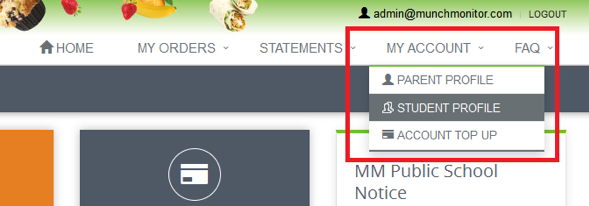
- From the top menu select MY ACCOUNT > STUDENT PROFILE
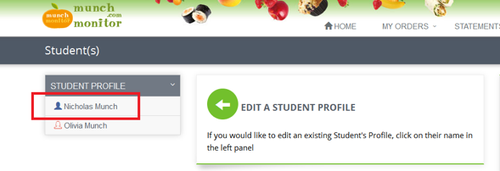
- On the left hand side click on your child’s NAME to edit
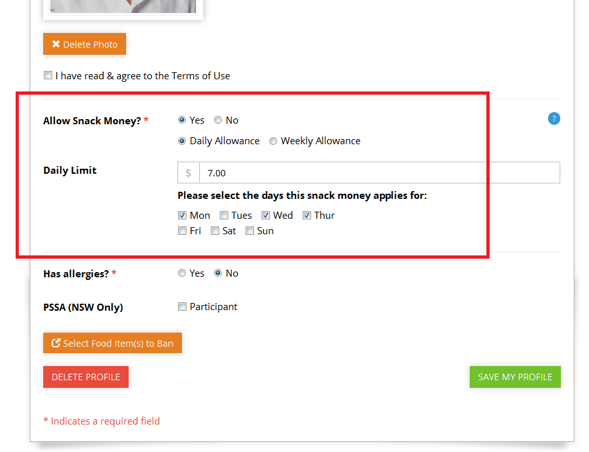
- Scroll down the Student Profile page to the ‘Allow Snack Money’ selection
- Select YES or NO to allow ‘Snack Money’ (ie to set a cashless allowance)
- Select either a DAILY ALLOWANCE or a WEEKLY ALLOWANCE
- Enter the allowance amount and the days for which the allowance applies
- When ready click the green SAVE MY PROFILE button to save your changes
CAN YOU STILL USE CASH AT THE CAFETERIA?
Yes you are able to however, it is our plan to LIMIT cash handling and will eventually phase this out.
CAN I ORDER LUNCH ONLINE?
Yes, you can still order lunch online by 8.00am. There will also be a wide range of food available which can still be purchased without ordering online.
DO I PAY EXTRA FOR USING THE ‘CASHLESS’ ALLOWANCE FEATURE?
No. There are no additional fees for using the ‘allowance Money’. Munch Monitor charge a flat fee of $3.65 inc per family account per school term. All members of your family can be on the one account.
WHO DO I CONTACT REGARDING ASSISTANCE WITH THE SITE?
The College Cafeteria Staff are available to answer any questions however, if you need assistance with the website and account balances, please call 1300 796 190 or email [email protected].